Tixel-Face Value Ticket Resale
- 0.0
- Rating
- 10.00K
- Installs
- Free
- Price

 Analysis by App-foxy
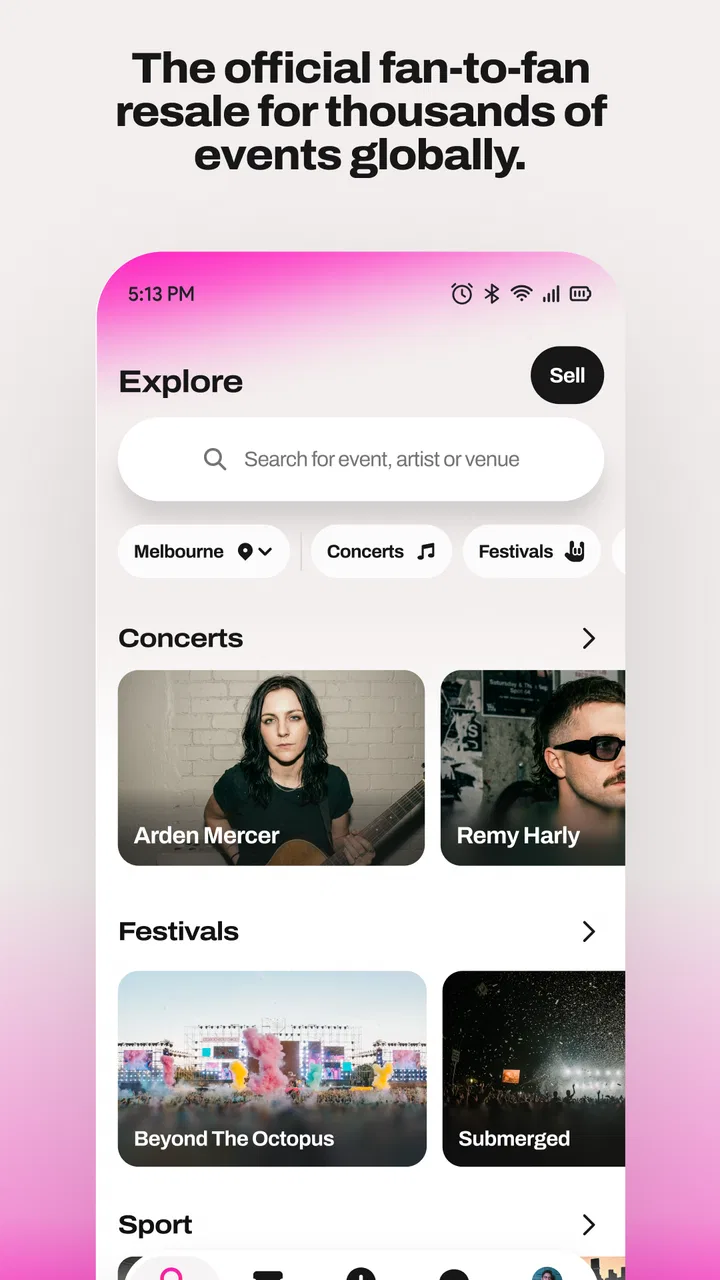
Buying a ticket from another person can feel unnecessarily risky, especially when the event is close and the price has already started climbing elsewhere. Tixel-Face Value Ticket Resale is built around a simpler idea: connect buyers and sellers while keeping resale prices capped. I found that its appeal is less about having a huge collection of extras and more about making the central transaction easier to understand.
This is a free Events app from Tixel, aimed at people who need to buy or sell event tickets without wandering through a confusing resale market. It is available for Everyone, and the current version is 1.0.2 for devices running Android 8.0 or later. The app was released on June 24, 2026, and has passed 10 thousand installs, so it is still a relatively young product rather than a long-established marketplace.
That early stage matters. I would not approach it as an all-purpose event planner or a replacement for every ticketing service. I see it as a focused resale tool: useful when a ticket is already available through the platform, particularly if avoiding inflated resale pricing is important to you. The capped-price approach gives the service a clear identity, but it also means your experience depends heavily on the event, the available listings, and the timing of your search.
You May Also Like

 Blood Strike: 2.5 Anniversary
Blood Strike’s Loadouts Turn Every Drop Into a Tactical Gamble
A close look at Blood Strike’s custom loadouts: how fast access to signature weapons reshapes its battle royale rhythm, rewards preparation, and narrows the gap between fights.

 Pandora - Music & Podcasts
Pandora’s Music Is Easy to Start, but Harder to Recover
Pandora’s strength is its low-effort path from a seed to a station. Its weak spot is how much confidence it asks you to place in connection, setup, and quiet recovery.

 8 Ball Pool
 Is Built on Rivalries, Rematches, and Routine
A close look at the rivalries, rematches, shared routines, and unanswered safety questions that turn a quick pool match into a persistent mobile community.

 Samsung Music
’s Quiet Strength Is Playing What You Already Own
Its reach comes less from spectacle than from dependable access to a personal library. That simplicity is both the app’s strongest retention engine and its ceiling.

 AccuWeather: Weather Radar
AccuWeather Review: A Quick, Clear Forecast for Everyday Decisions
For everyday plans, the best forecast is the one you can understand quickly. AccuWeather makes rain timing, radar, and local conditions easy to act on, with a few trade-offs.

 Hill Climb Racing
Why Hill Climb Racing Still Turns Crashes Into One More Run
A tiny car, a bumpy hill and one more upgrade: Hill Climb Racing keeps resurfacing because its simple chaos makes every near-miss feel personal.
More From Our News Desk



Getting past the first points of friction
The first place users can get stuck is before they even make a purchase. A resale app can look straightforward, yet the practical questions arrive quickly: is the event listed, is the ticket type suitable, can the seller transfer it, and does the listing match the exact date and venue you need? I recommend treating the first search as a verification step rather than rushing straight to checkout.
Start by searching with the event name as precisely as possible. Similar events, multiple sessions, and different venue locations can make a quick search misleading. If you are buying for a group, check each listing carefully instead of assuming that several tickets shown together will meet your seating or entry requirements. A capped price does not automatically make every listing equally useful.
One practical habit is to decide your non-negotiables before opening the app. Write down the event date, location, ticket quantity, and any seating preference. This prevents the common mistake of choosing a cheaper-looking option that does not actually work for your plans. It also makes it easier to notice when the available inventory is too limited and another purchasing route would be wiser.
For sellers, the same preparation helps. Have the original ticket details available before creating or completing a listing, and make sure the information you enter describes the ticket accurately. I would avoid listing while distracted or immediately before leaving for the event. A rushed listing creates more opportunities for mismatched details, delayed responses, or confusion during transfer.
The app’s short store description, “Tixel,” does not explain the practical side of the experience, so expectations should remain grounded. This is not a promise that every event will have immediate availability. A capped-price marketplace can protect buyers from extreme markups, but it cannot create tickets where none are being offered. If an event is sold out and no one is reselling, repeated refreshing is unlikely to solve the real problem.
Setup checks that save time later
Before judging the app, I would check the basics on the phone itself. Because the minimum operating-system requirement is Android 8.0, older devices should be checked first rather than troubleshooting an installation that the phone cannot support. On a compatible device, make sure the app has finished installing properly and that the phone has a stable connection when loading event information.
I also recommend reviewing the account details you intend to use before you begin a time-sensitive purchase. Keep access to the relevant email or sign-in method available, because ticket transactions often become stressful when the buyer cannot retrieve a confirmation or respond to a transfer request. This is simple preparation, but it matters more than repeatedly closing and reopening the app.
If a screen appears incomplete, I would first wait briefly and retry the specific action once, especially on a weak mobile connection. Then I would switch between a reliable Wi-Fi connection and mobile data if possible. This separates a temporary network delay from a broader app problem. Avoid tapping a purchase or submission button repeatedly while the screen is still processing; duplicate attempts can make it harder to understand what actually went through.
Another useful check is the phone’s available storage and general responsiveness. A device that is nearly full or already struggling with other apps may make a new app appear unreliable. Closing demanding background apps, restarting the phone, and trying again are sensible general steps. They will not fix an unavailable event listing, but they can remove local performance problems from the investigation.
When an update is available, installing it is also a reasonable step. Version 1.0.2 suggests that the app is still in an early phase of development, so keeping the installed version current is particularly sensible. I would not assume that every issue is caused by the update itself, though. The right approach is to note exactly what failed, when it failed, and whether the same action works after a clean restart.
A safer way to recover a stalled transaction
My preferred recovery workflow is deliberately slow. First, stop pressing buttons and note the last screen you clearly saw. Second, check whether you received any confirmation through the account or contact method associated with the transaction. Third, reopen the app and look for the event or transaction status before attempting the same action again.
This matters most when money or ticket ownership may be involved. If a payment screen seemed to complete but the app did not visibly advance, repeating the purchase immediately is not a good troubleshooting method. Confirm the status first. A short pause and a careful review are less frustrating than accidentally creating uncertainty about multiple attempts.
For a buyer, recovery also means preserving the event details you selected. If you return to the listing, compare the date, venue, quantity, and ticket description again. Do not rely only on memory, especially if several similar events are available. For a seller, keep a clear record of the listing information and any transfer step you have completed. This gives you a reliable reference if the app appears to return to an earlier screen.
If the app closes unexpectedly, I would restart it and repeat only the last necessary step. If that fails, restart the phone and check the connection. Clearing local app data or reinstalling can be a more disruptive measure, so I would reserve it for situations where ordinary restarts do not help and only after making sure I can sign back in and access the account details I need.
One of the most useful non-obvious habits is to avoid troubleshooting while the event is actively becoming urgent. If you need a ticket for tonight, give yourself a backup plan before the final hour. A resale marketplace is most helpful when you have enough time to inspect the listing and recover from a technical delay. It is a poor place to depend on last-second improvisation.
Separating app problems from ticket and event problems
Not every disappointing result is a software failure. A listing can disappear because another buyer completed the purchase, or an event can have limited resale inventory. If the app loads normally but the ticket you want is no longer available, that is a marketplace condition rather than evidence that the installation is broken.
The same distinction applies to price. Tixel’s capped-price model is a meaningful advantage over open resale markets, where popular tickets can rise sharply. However, a cap does not guarantee that the ticket will be inexpensive in absolute terms, nor does it guarantee that every seating area will be represented. The available price still depends on what sellers have listed and which ticket category you choose.
Event-specific rules can create friction too. Entry requirements, name matching, delivery methods, and transfer timing may be controlled by the event organizer or the original ticket issuer rather than by the resale app. If an issue only appears at the venue, the right contact may be the event organizer or ticket issuer. The app can be the place where you found the ticket without being the authority that controls admission.
This is why I would inspect the ticket description carefully and keep any relevant confirmation available until entry is complete. A screenshot or remembered listing title is not a substitute for the actual transaction information, but having your records organized can make it easier to resolve a misunderstanding. I would also avoid assuming that a seller’s message changes the official terms of the event.
Compared with general classified-ad apps, Tixel feels more appropriate when you want a resale environment centered on tickets and capped pricing rather than negotiating privately with a stranger. Compared with the original event seller, it is useful when the primary sale is unavailable and another attendee is reselling. The trade-off is that the original seller may offer a more direct path for event-specific support, while the resale app depends on available listings and the details attached to them.
Who will benefit most from the capped-price approach?
I think the app is a good fit for a buyer who is flexible enough to compare available listings but still wants protection from the most aggressive resale behavior. It is also practical for someone whose plans changed and who wants a dedicated place to offer a ticket rather than posting it in a general social feed. The focused purpose makes more sense when the event and ticket are already clearly defined.
A realistic everyday example would be a concertgoer whose friend cancels two days before the show. I would open the app, search for the exact event, compare the remaining listings, and confirm that the ticket type suits the friend who may take the spare place. If the available listing is acceptable, the capped-price structure can make the decision easier than negotiating through messages with an unknown seller. If no suitable ticket appears, I would stop searching and consider the official event channel instead of assuming the app is malfunctioning.
The app is less suitable for someone who needs a guaranteed ticket immediately, wants extensive event discovery tools, or expects every resale listing to include identical delivery and entry conditions. It may also be a poor choice if your priority is a particular seat and you are unwilling to compromise. In those cases, the original ticket provider or a larger marketplace with broader inventory may be better, even if the pricing model is less appealing.
Sellers should think about timing as well. Listing early gives potential buyers more opportunity to review the event and complete their plans. Waiting until the last possible moment may reduce the usefulness of the listing, especially if transfer or communication takes time. I would describe the ticket precisely, monitor the transaction rather than assuming it is finished, and keep the relevant account access available until the process is complete.
For families and groups, I would pay special attention to quantity and seating togetherness. A capped price is not enough if one person ends up in a different section or if the group cannot enter under the same conditions. The app can help locate resale supply, but the buyer still has to make the final judgment about whether the listing fits the group’s practical needs.
What I would change about my own usage
After using the app, I would make three habits part of every transaction. I would search earlier than feels necessary, verify the event details twice, and keep a backup option for urgent plans. These habits address the real weaknesses of resale: limited inventory, changing availability, and the possibility that an event’s own rules matter more than the marketplace interface.
I would also separate browsing from buying. During browsing, I compare ticket type, timing, and suitability. During buying, I slow down and confirm the final details before submitting anything. This two-stage workflow reduces impulse decisions caused by seeing a listing disappear or fearing that another buyer will claim it first.
For sellers, I would prepare the ticket information before opening the listing flow and avoid making changes from an unreliable connection. If the app appears not to respond, I would check whether the listing action actually completed before trying again. That small pause is one of the best ways to prevent confusion when the interface is under pressure.
There is also a broader trade-off worth understanding: the capped-price promise is valuable precisely because it limits the kind of pricing freedom that attracts speculative sellers. That can make the marketplace feel fairer to buyers, but it may also affect how quickly tickets appear or how much choice sellers have. I consider that a reasonable exchange for people who dislike inflated resale, but not everyone will prefer it.
My practical verdict
Tixel-Face Value Ticket Resale is a focused Events app with a clear reason to exist: it gives buyers and sellers a dedicated place to handle ticket resale at capped prices. I like that the concept is easy to understand, and I can see the value for people who want an alternative to open-ended resale pricing. The free download and Everyone age rating also make it approachable for a broad audience.
My recommendation comes with a condition: use it as a planned resale tool, not as a guarantee that a ticket will appear at the exact moment you need one. The early version and modest install base suggest a service that may still be growing, so I would keep expectations realistic about inventory and occasional setup friction. When something goes wrong, I would first distinguish a connection or account issue from a sold listing, an event rule, or a transfer condition.
If your priorities are capped resale pricing, a focused ticket workflow, and the possibility of finding a ticket after the primary sale has ended, this app is worth trying. If you need guaranteed availability, highly specific seating, or the most direct event support, start with the original ticket provider or compare another marketplace as well.
In short, I would recommend it to a friend who has a clearly identified event and enough time to check the details carefully. Its strongest quality is the pricing principle, while its main practical limitation is that no marketplace can control how many suitable tickets other people choose to list. Used with that understanding, Tixel is a sensible, focused option rather than a magic solution to every ticket problem.
FAQs for Tixel-Face Value Ticket Resale
01What is Tixel-Face Value Ticket Resale?
Tixel is a ticket resale marketplace designed to help people buy and sell tickets for concerts, festivals, sports events, theatre shows, and other live experiences. Its main appeal is that tickets are generally resold at face value or within limits set by the platform, rather than being heavily marked up. Availability, supported events, and local rules can vary depending on your country and the event organizer.
02Can I trust tickets purchased through Tixel?
Tixel includes marketplace protections intended to reduce the risk of receiving invalid, duplicated, or fraudulent tickets. Depending on the event and region, the platform may verify listings, transfer tickets securely, or provide buyer protection if a ticket does not work as promised. However, users should still check the event details, delivery method, seller information, and applicable guarantee terms before completing a purchase.
03How do I sell tickets on Tixel?
To sell a ticket, you typically create an account, select the relevant event, upload or enter the ticket details, and choose the available listing options. Tixel may require information such as the ticket type, barcode, seat details, or transfer instructions. After a successful sale, the ticket is delivered to the buyer according to the event’s process, and seller payouts are usually made after the transaction conditions are met.
04Are Tixel tickets always sold at the original face value?
Tixel focuses on fair and transparent resale, but the exact price rules can depend on the event, venue, organizer, and local regulations. Some tickets may be listed at face value, while others can include permitted fees or a limited adjustment. Before paying, carefully review the total amount, including service charges, taxes, delivery costs, and any other fees shown at checkout.
05What should I check before downloading and using the Tixel app?
Before downloading Tixel, confirm that the service operates in your country and supports the event you want to attend. Review the app’s privacy policy, account requirements, payment methods, refund conditions, and ticket guarantee limitations. You should also keep your email and payment details secure, enable notifications for ticket transfers, and use only the official Android or iOS application to avoid imitation apps.
Pros
- Buy and resell tickets at transparent prices without hidden markups.
- Secure digital ticket transfers help reduce fraud and counterfeit listings.
- Event-focused marketplace makes finding tickets for specific shows simple.
- Mobile access lets you manage listings and tickets while on the go.
- Seller payouts are handled through the platform for added convenience.
Cons
- Availability depends heavily on the event
- location
- and current seller demand.
- Some popular tickets can sell out before you complete the checkout process.
- Refund and cancellation rules may vary by event and ticket type.
- Service or processing fees can increase the final purchase price.
- Support response times may be slower during major event releases.

Tixel-Face Value Ticket Resale
Gallery